Introduction
Fill out this guide in operator view for installation technical support
- To fill out this guide, you must be assigned a user profile. Please contact Mid City Engineering by emailing sales@midcityengineering.com or calling 312-421-1114 and you will be emailed a link to create a user profile and assigned a support ticket #.
- Once you have setup a login, click on “Operator View” in the upper right-hand corner of this page. You will be prompted to login.
- Once logged in, you will enter the operator view. Enter your support ticket # and click “Start Guide”
- While filling out this guide, you may be asked to answer questions, upload photos or videos, and perform tests.
- Uploading photos and videos is easiest from a smart phone or tablet. You can either browse a photo in your gallery or take one from the step on the website. It is recommended to complete this guide using a smart phone or tablet with a quality camera.
- Once you have completed the guide, please contact us by phone or email and let us know you have completed the guide and a member of our support team will review the information provided.
-
-
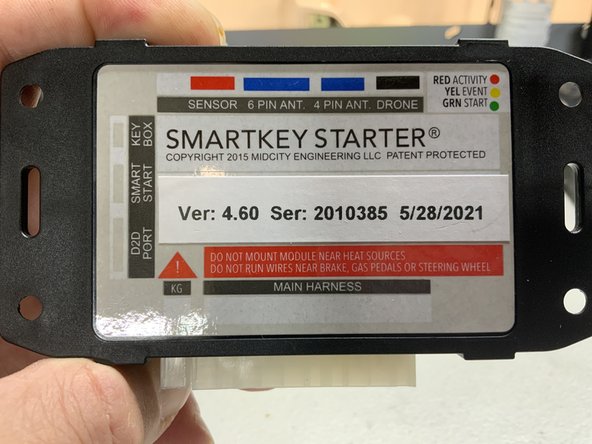
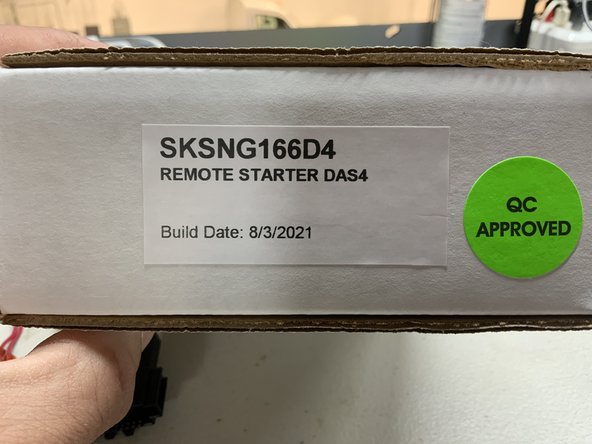
There will likely be two part #s on the kit you are installing.
-
One part # will be on the outside of the box that the kit came in
-
Part #s will be on any modules in the kit
-
The part #s on the modules may be different than the part number on the box the kit came in
-
Please make sure that the part # on the box matches the part # on the invoice or order confirmation
-
-
-
Verify vehicle model and year.
-
Model year can be verified by looking at the VIN. The 10th character of the VIN identifies the model year. The model year may be different than the build date year. It is important to know the model year.
-
VIN year charts are easily accessible on Google
-
Be sure to check application compatibility on our website. and verify that you have the correct kit
-
-
-
The more information we have, the better. Please input all you can below.
-
There are options to upload videos and picture. For example, if you are installing a remote start and cannot get the remote start to work, a video of instrument cluster during the remote start can be very helpful.
-
-
-
Space below to ask additional questions or add any relevant info.
-
Options below to upload any documents that might be helpful
-
Options below to upload additional images and/or video
-