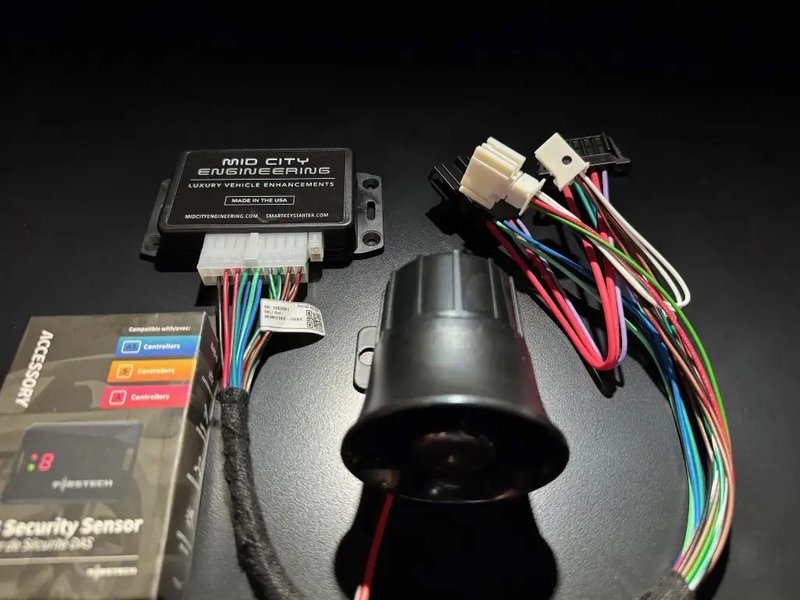
Owners Manual and User Guide for SKSNG906 and SKSNG906RV SmartKey Starter®
CAUTION
It is the responsibility of the vehicle operator to ensure their vehicle is parked in a safe and responsible manner.
- When leaving the vehicle, it is the user's responsibility to ensure that the vehicle is in a safe location to start remotely. If the vehicle is indoors or any other location where it should not be running, it is the user’s responsibility to ensure that the system is put in valet mode (remote start off) before leaving the vehicle. See below for valet mode instructions.
- It is the user's responsibility to ensure that the remote starter is disabled and put into valet mode before servicing.
How to put SmartKey Starter® in valet mode (remote start off):
The SKSNG906 and SKSNG906RV modules have a valet switch. The valet switch is used to turn the remote starter on and off (valet mode). The switch has a white dot and is round and black.
White dot pressed ‘’IN’’ = remote start ON/enabled
White dot pressed ‘’OUT'' = remote start OFF/disabled (valet mode)
To disable remote start (valet mode)
- Locate switch
- Turn switch so that blank side is pressed in/white dot is out
- Test remote start (attempt to remote start vehicle)
- Remote start should fail and produce error code (# of parking light flashes)
Special notes for servicing:
- The SmartKey Starter® must be put in valet mode (remote start off) before the vehicle is serviced.
- Drive vehicle for at least 30 miles without issuing a remote start command before undergoing any diagnostics or emissions testing.
Remote Start Operation:
Activation
- The remote start can be activated using a 'lock-unlock-lock' sequence from the OEM key fob
Note: the OEM key range for the 2007-2018 Sprinter is very poor. We recommend using either an external RF remote (Compustar) or smart phone application (Drone Mobile or Smart Start) to activate remote start. Follow manufacturer app/RF remote instructions for enabling remote start.
Note: The default remote start run-time for the SKSNG906 & SKSNG906RV is 1 hour. This can be changed in the menu (see below).
When using this auto start with external start trigger, the system will re-start if a new signal is applied to start wire after run-time expiration. The system will continue running and re-starting when a new start signal is applied up to 5X or 10X, depending on settings (For example, if using auto start with a battery monitor and start/stop relay, the vehicle will restart if run time has expired but a new command is issued from the battery management system to start.
- Optional add-ons for remote start and alarm include smart phone control (Compustar Drone or Directed Smart Start) or extended range RF remotes (Compustar or Directed). Refer to external device operation instructions for details.ld be when starting the vehicle
Options settings and programming:
Error
Current text:
[title|SKSNG906 and SKSNG906RV Feature and Option Programming]
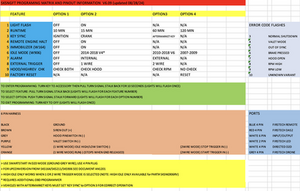
The SKSNG906 and SKSNG906RV have option and settings programming available using the turn signal stalk. The video below shows an example of option programming. The example shown is feature 4, option 2 (remote engine halt on).
See programming matrix below for feature and option list.
To enter programming:
- Turn key to ACC (1st position)
- Pull turn signal back (towards you) for 10 seconds. Parking lights will flash 1X
To select feature:
- Pull turn signal stalk back (towards you).
- Parking lights will flash once.
- Either select an option (see programming matrix below) or to move to next feature, pull the stalk back again. Parking lights will flash twice, indicating feature 2.
- Continue pulling stalk back until at desired feature. There are 10 features. See programming matrix for feature and option details.
To select option:
- Push turn signal stalk forward (away from you).
- Parking lights will flash once. This is option 1.
- To get to option 2, push stalk forward again and parking lights will flash twice, indicating option 2.
- Continue until at desired option.
- Once at desired feature and option, exit programming.
Programming matrix:
Example video:
Video below shows an example of option programming. The example shown is feature 4, option 2 (remote engine halt on)
- Note: if SmartKey Starter® is power cycled (unplugged and plugged back in, vehicle loses power, etc), the settings will return to the default factory settings. Any settings changes made in the field will need to be changed again.
Alarm operation:
- The SKSNG906 is equipped with a full alarm and the alarm package can be added to the SKSNG906RV. The alarm is armed any time that the doors are locked using the OEM key fob or external device (smart phone control, extended range RF remotes) and the ignition is off and all doors are closed.
- When the alarm is armed and any door is opened, the alarm (external siren) will sound.
- If you have smart phone control and/or 2-way RF remotes connected to the SmartKey Starter® you will receive alarm alerts.
- Alarm can be disarmed by hitting unlock on the OEM key fob and/or external device
High idle operation:
Only available for SKSNG906RV
The SKSNG906RV includes high idle. The high idle can be activated 2 different ways:
- When remote or auto start is activated, the high idle will be engaged automatically while the engine is started remotely.
- If engine is started manually, high idle can be activated by engaging the parking brake and then pulling the the high beam / turn signal stalk towards you. To turn high idle off pull high beam / turn signal stalk toward you again. See demo video below:
- To increase idle RPM, press turn signal stalk up
- To decrease idle RPM, press turn signal down
Four Year Limited Warranty
Mid City Engineering, LLC. warrants to the original purchaser that this product shall be free of defects in material and workmanship under normal use and circumstances for the period of (4) four years from date of purchase. When the original purchaser returns the product to the retail store with an accompanying bill of sale where it was purchased within the warranty period, after evaluation, Mid City Engineering, LLC. will, at its option, repair or replace the product.
Mid City Engineering, LLC. is not responsible or liable for any damages whatsoever, including but not limited to any consequential damages, incidental damages, damages for loss of time, loss of earnings, commercial loss, loss of economic opportunity and the like that may or may not have resulted from the installation or operation of the Smartkey Starter®. Not withstanding the above, manufacturer does offer a limited warranty to replace or repair the control module as described above.
The product warranty is automatically void if the date code and/or serial number is defaced, missing, or altered or product is tampered with. This warranty will not be valid unless you have an accompanying bill of sale.